Last Friday saw the electronic GA (you can download it, not get the DVD yet) of WebSphere MQ File Transfer Edition 7.0.2. This is the 3rd release of the product, and the 2nd this year. I thought I would take a few moments to highlight some of the new features in 7.0.2 that might be of interest to you.
Protocol Bridge
This function allows you to access files stored on either an FTP or sFTP server, whilst still using an agent and everything else within FTE. An agent configured to access FTP or sFTP is known as a “Bridge Agent” and is a dedicated artifact in that transfers must involve the FTP/sFTP server. This can be used in a number of ways in the enterprise. You might for example have FTP internally as your current method of moving files from A – B and want to do a gradual role out of FTE to replace it, and with this new function you can. See the Protocol Bridge Infocenter page for more details.
Improved Security
The 7.0.2 release has some improvements to security, in particular you can now grant users authority to perform certain actions. This is a very detailed topic, and I will not try and capture it all in a short paragraph, it would be best for me to link to the relevant Infocenter pages. See the Security Overview Infocenter page and also the Managing authorities for resources Infocenter page for more details.
Multi Instance Queue Manager Support
WebSphere MQ 7.0.1 supports the creation of Multi-Instance Queue Managers and in WebSphere MQ FTE 7.0.2 we can use this functionality for agent queue managers and coordination queue managers. See the WebSphere MQ Multi-Instance Queue Mangers Infocenter page for more details.
IBM i (iSeries) Platform Support
This latest release of FTE supports the transfer of files that reside in the “root” (/), QOpenSys, and QSYS.LIB file systems on IBM i systems. See the Installation page for IBMi in the Infocenter, and also the IBMi Transfer Infocenter page for more information.
fteCreateTemplate
A new command has been introduced that allows you to create Transfer Templates on the command line. This enables you to create Transfer Templates in the same way as on the WMQFTE Explorer plugin. See the fteCreateTemplate Infocenter page for more information.
Improved concurrent transfer limit behaviour
In previous versions of FTE if an agent reached the maxSourceTransfers property then any incoming transfers would automatically be failed. In 7.0.2 we now queue these incoming transfers and wait until the agent has capacity to run them. We have introduced a new property called maxQueuedTransfers, which will limit the number of queued transfers, before rejecting transfer requests. See the Advanced agent properties Infocenter page for more information.
So there you have it, these are the main features of 7.0.2. I have only touched very lightly on all of them, please see the Infocenter, or contact your local IBM representative to find out more!
Categories: IBM · MFT · WMQFTE · WebSphere MQ
Tagged: 7.0.2, fte, websphere, WebSphereMQ, wmq, WMQFTE
I am working on an internal project in my spare time at IBM that requires some marshalling of XML using Java. The obvious candidate is JAXB which in the main works very well. However when it fails, information on the web can be frustrating, telling you to fix it using <jaxb:property> but not actually giving you any useful information. I admit this is for a specific error that I needed to fix, but I do not think it is uncommon.
Therefore I have written a short xsd example that when run through xjc.sh (or xjc.bat on windows) exhibits the same error I was getting. The contents of the Dummy.xml file are as follows (sorry for formatting, wordpress not me!):
<?xml version="1.0" encoding="UTF-8"?>
<xsd:schema xmlns:xsd="http://www.w3.org/2001/XMLSchema">
<xsd:complexType name="complexTypeOne">
<xsd:simpleContent>
<xsd:extension base="xsd:string">
<xsd:attribute name="value" type="simpleTypeOne"/>
</xsd:extension>
</xsd:simpleContent>
</xsd:complexType>
<xsd:complexType name="complexTypeTwo">
<xsd:simpleContent>
<xsd:extension base="xsd:string">
<xsd:attribute name="value" type="simpleTypeTwo"/>
</xsd:extension>
</xsd:simpleContent>
</xsd:complexType>
<xsd:simpleType name="simpleTypeTwo">
<xsd:restriction base="xsd:string">
<xsd:pattern value="[0123456789]+"/>
</xsd:restriction>
</xsd:simpleType>
<xsd:simpleType name="simpleTypeOne">
<xsd:restriction base="xsd:token">
<xsd:enumeration value="exist"/>
<xsd:enumeration value="noexist"/>
</xsd:restriction>
</xsd:simpleType>
</xsd:schema>
The Dummy.xml file consists of two complexTypes with an attribute of the same name, not a huge problem as the Java XML parsers run quite happily when validating XML, but when it comes to using JAXB code generation it falls over. In this case the same name is value and when run with xjc.sh produces the following error:
Property "Value" is already defined. Use <jaxb:property> to resolve this conflict.
The way to fix this issue is indeed to use a <jaxb:property> tag, and the way I found to fix this was using an external bindings file. This file will detail alternate names to use for the clashing names and will allow JAXB to parse without throwing errors. The bindings.xsd can be found here:
<jxb:bindings version="2.0"
xmlns:jxb="http://java.sun.com/xml/ns/jaxb"
xmlns:xsd="http://www.w3.org/2001/XMLSchema">
<jxb:bindings schemaLocation="Dummy.xml" node="/xsd:schema">
<jxb:bindings node="//xsd:complexType[@name='complexTypeOne']">
<jxb:bindings node=".//xsd:attribute[@name='value']">
<jxb:property name="ValueToFixError1"/>
</jxb:bindings>
</jxb:bindings>
<jxb:bindings node="//xsd:complexType[@name='complexTypeTwo']">
<jxb:bindings node=".//xsd:attribute[@name='value']">
<jxb:property name="ValueToFixError2"/>
</jxb:bindings>
</jxb:bindings>
</jxb:bindings>
</jxb:bindings>
The bindings.xsd defines the xml file to perform the modifications to (schemaLocation="Dummy.xml") and then specifies using XPATH notation the relevant values to change. Fairly self explanatory if you can see the files for yourself, less so if you are just told to use tags! To specify the bindings.xsd on the command line simply do: xjc.sh -b bindings.xsd Dummy.xml which should now compile your code!
Categories: Uncategorized
Tagged: jaxb, jaxb:property, xml
A long time ago I worked for the MQ Performance team, my current role is still loosely linked to that team as I am working on the performance for WebSphere MQ FTE. Recently I was asked to help a customer improve the performance figures that they were seeing from a JMS application. The application in question was actually the JMS Performance Harness, which can be found on Alphaworks. Many of the suggestions we made can be found in the myriad of performance reports that MQ delivers as Performance SupportPacs. These are delivered as PDFs, and as far as I know are not indexed by Google, which means that searching for information on MQ performance will not always give you the help that you were looking for. So I decided to compile the following hints and tips that you should use to improve performance.
Disclaimer: This post not sanctioned by IBM, and I am not copying information from the Performance reports verbatim. The following hints and tips are designed to improve the performance of your applications, when making changes to your environment you should ensure that the changes do not have unwanted side effects. Myself, or IBM, are not responsible for loss of data etc etc when using this information.
- Use non-persistent messages where possible. Using persistent messages will require MQ to write the data to disk, which can be a performance bottleneck.
- If you need to use persistent messages, ensure that you have are either using a separate disk for your MQ log files, or in an optimal scenario are using battery backed cached disks, for example a SAN.
- Even if you are using non-persistent messages, the per queue buffer size might mean that MQ writes the non-persistent messages to disk. To avoid this you should set the
DefaultQBufferSize and DefaultPQBufferSize for your queue manager to larger values. The default is 256kb
- If you are using Channels, you can set the BindType to be
FASTPATH. This will effectively reduce the CPU usage on the server, but it does mean that custom UserExits that are poorly written will not only crash your channel, but your queue manager too
- MQ Version 7.0 introduced a new channel property called
sharecnv. This property defines how many threads can use a single socket (the default value is 10). Setting this value to 1 may improve performance by limiting a single thread per socket.
- JVM heap size is also important. Ideally you want to limit the number of times that the Garbage Collector is called. MP07 recommends that optimal GC interval is around 1-2 seconds.
The above points are by no means exhaustive. They are meant to stimulate MQ users into thinking a little more about getting the most out of the Queue Managers, and their applications.
MQ put a lot of time into developing Performance Reports, and it would be remiss of me to not mention them in this post. For each performance report there is a section that discusses performance for the platform (with the exception of the JMS report that is platform agnostic). The above points should be used in conjunction with the relevant report. The following is a list of links to the most recent reports for MQ Version 7:
- MP07 – MQ Version 7 JMS Performance Report
- MP6N – MQ Version 7 AIX Performance Report
- MP6P – MQ Version 7 Solaris Performance Report
- MP7I – MQ Version 7 Windows Performance Report
- MP6O – MQ Version 7 HP-UX Performance Report
- MPL5 – MQ Version 7 Linux Performance Report
- MPL6 – MQ Version 7 Linux (zSeries) Performance Report
Categories: SupportPacs · WebSphere MQ
Tagged: mq, performance, WebSphereMQ
I recently posted about my first WebSphere SupportPac (FA01). The SupportPac basically allows your FTE network to be defined within WSRR using custom models. Although there is a pdf detailing install/setup contained in the download for FA01 I thought it would be useful to document here the steps required to install and configure the plugin. This information is for Version 1.0 of the plugin. Future versions may require different steps.
Software in use for this blog post
WSRR 6.3 using DB2 for its database
WMQ FTE 7.0.1
Installing the Plugin
All the following steps take place using the Configuration Perspective of the WSRR web application.
First install the plugin jar file, this is performed under the “Active Profile -> Plugin JARs” section. Click “Load JAR Plug-in”, browse your local filesystem to find the FA01 jar, call it anything you like – preferably something related to FA01, or WMQFTE. Now that we have loaded the JAR into WSRR’s classpath, we can now load the model and setup the ServiceDiscovery configuration.
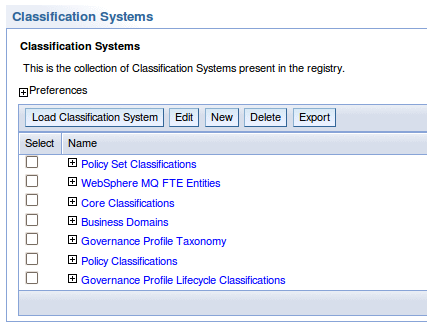
In order to create the required objects in WSRR we need to pass in the OWL file which defines the objects in use by the plugin. The fte_model.owl can be found in the zip file under the folder called models. Navigate to “Active Profile -> Classification Systems”. Click “Load Classification System” and using Browse locate the fte_model.owl file. You should then see WebSphere MQ FTE Entities in the list of Classifications:

WSRR Classifications
WSRR now needs to now how to run the plugin. This is done using the “Active Profile -> Service Discovery”. Clicking on the ServiceDiscoveryConfiguration link will take you to an xml editor in which you can setup FA01. Look at this xml file (WordPress don’t allow txt files, so you have it as a .doc :S), you need to paste the contents of that doc into the xml editor, make sure you paste inside the tag at the bottom of the editor. You need to change the qmgr/host/port/channel values to reflect your coordination queue manager settings. Click OK to save this configuration.
Finally to enable regular running of the plugin we need to configure the scheduler. This can be found again using the menu option “Active profile -> Scheduler”. You should see the ServiceDiscoveryScheduler, which when clicked will again give you an editor with some xml. You need to add the xml from this Scheduler Config document. Change the intervalGranularity and interval values to suit your needs. Check the WSRR Infocenter for allowed values. Once you save this the Scheduler should run your plugin, and the FTE Concepts should start to appear in the relevant Perspective.
If you experience problems with the ServiceDiscovery Plugin, check your WSRR SystemOut and SystemErr logs, as the plugin will output information that will help to diagnose the problem
Categories: IBM · SupportPacs · WMQFTE · WebSphere MQ
Tagged: mq, supportpac, WebSphereMQ, wsrr
Back in November 2008 I had a crash, with my little Ford KA being written off. Basically someone T-Boned me on a mini roundabout, when I had right of way. 2 ambulances, a fire engine and a police car were all in attendance (even though both myself and the other driver were all were able to get out without any problems). Still it was nice to see the emergency services reacting so quickly! I exchanged details with the other driver, and we tentatively agreed that I was not at fault. I wish not to name his insurance company, but to give an indication the quotes that they tend to give me for my KA were usually £800+. Knowing the premiums that this company charged I felt confident that the claim would be dealt with swiftly, what a stupid thought that was.
My insurance company arranged a very quick removal of my car, the details of the crash were logged, and I was very pleased with the service. My level of insurance was such that a temporary hire car was a risk, if the other party did not admit liability for the crash then I would have to foot the bill, if they did admit liability I was free to claim on their insurance for a hire car. I declined this option deeming the risk too great. Instead Su’s parents stepped in with a kind offer of their second car till Christmas. I cannot tell you how grateful I was for this gesture!
After a few days I contacted my insurance company, who assured me that they would contact the other party’s insurance company and then the fun would begin. 1 month later we were still waiting to hear from the other party’s insurance company. In fact we waited a very very long time. Whilst we were waiting we received the money for my car (as it was written off) minus the excess as the other party had yet to admit liability.
Many phone calls and weeks later…. In June I received a letter informing me that we were going to take matters to the courts, as the other insurance company had not responded. I was incredulous, 6 months had gone by and still two insurance companies had not managed to talk to each other, and I can only take it on the word of my company that it was the others fault. I dutifully filled out the forms, and roughly 2 weeks later we received a letter and a cheque for my excess. The other company had finally got in touch, and agreed that the crash was not my fault! It was such a shame that it took this long (nearly 7 months) and the threat of court to get this resolved.
One last thing, whilst waiting for the other insurance company to get in touch I had to renew my car insurance. As the crash was still against me, having paid out for the excess I was looking at a premium without a No Claims Bonus, which after some searching around we decided was ok (we were fairly confident that we would get our NCB and excess back). The renewal was with the same company that I was with when I had my crash, and yet once I was told that the crash was not my fault, I had to call them to ask for this year’s premium to be adjusted in accordance with regaining my NCB! Surely they should have a system where they contact me!
Anyways this post was all about having a cathartic release as it has been more stressful then I imagined.
Categories: Uncategorized
Tagged: carcrash, insurance, success
WebSphere MQ File Transfer Edition is a product that I work on, at it’s basic level it allows users to transfer files from A to B using WebSphere MQ as the transport. Maybe another day I’ll blog about it, but you can read some more information here. WebSphere Service Registry and Repository (WSRR) is a product developed at IBM Hursley labs, and fits into the Governance space of applications (at least in my eyes, please correct me if wrong!). It does many many things, read here for more information. The part I am particularly interested in is the developing of custom models and relationships to store user defined information, in this case WMQ File Transfer Edition objects and MQ Queue Managers. This is what the SupportPac FA01 does.
SupportPac FA01 supplies an OWL file, which defines Agent, Queue Manager and MQ Connection objects and the relationships (Agent -> MQConnection <- Queue Manager) which allows us to model an FTE network inside WSRR. The SupportPac uses the WSRR Service Discovery Framework and the scheduler to keep the information current and up to date. Information on developing your own custom Service Discovery services can be found here.
Once data is in WSRR it allows users to query FTE objects, and perform transfers based on their own rules and requirements. Using the WSRR Rest API users can easily develop web or clientside applications that can exploit the FTE network information.
The SupportPac contains all the information required to install and configure the Service Discovery plugin, however in a later post I plan to put the information here for everyone to see.
Categories: IBM · SupportPacs · WMQFTE
Tagged: supportpac, websphere, WMQFTE, wsrr
Just a quick post, as much for my benefit as anyone else’s! In running our automation it was required that when a new queue manager is created we edit the windows registry for that queue manager. Put simply, I did the following steps:
- Created an XA Resource Manager using the MQ Explorer
- Started my Queue Manager to make sure my changes worked (they did)
- Stopped the Queue Manager
- Exported the ‘XA Resource Manager’ key for my Queue Manager using regedit into a file
- Deleted the ‘XA Resource Manager’ key from the registry.
- Started my Queue Manager to make sure my deletion did not break anything
- Stopped the Queue Manager
- Imported the registry file using
regedit /s registry.file
- Tried to start the queue manager and got an error
An expected stanza in the configuration data is missing or contains errors. and an fdc.
Turns out that all I need to do to get this to work is: amqmdain regsec and that will fix the registry permissions!
Infocenter page for amqmdain can be found here.
Categories: IBM · WebSphere MQ
Tagged: mq, registry, windows
Recently IBM announced a SupportPac for WebSphere MQ for the Eclipse based WMQ Explorer. Called MS0T it is classified as a category 3 SupportPac and can be downloaded from the MS0T page.
One outcome of this Standalone edition of the WMQ Explorer is that you now no longer need to use the full WebSphere MQ installer and can just have the Explorer without the other parts of the product. This is pretty neat when you also want to administer your WebSphere MQ File Transfer Edition network on a remote machine without a full install. As of writing this post WMQ FTE does not support automatic installation of the File Transfer Plugin for the MQ Explorer and manual steps are required, and there are no plans to do so at present. Here are the manual steps required to make this work:
- Install SupportPac MS0T (currently Windows only, support for Linux coming soon!)
- Install the tools edition of WMQ FTE on the same machine as your Standalone Explorer is installed
- Create a file called
com.ibm.wmqfte.link in the Standalone Explorer eclipse/links folder that contains the following path=c:/your/wmqfte/tools/install/location
- Start Explorer and you should see the familiar (if you have used it before) File Transfer Edition icons on the left hand side!
Please note: The slashes in the above property are forward slashes and must be forward slashes for this to work!
Let me know if you manage to get this working, or if not what went wrong!
Update: There is an official technote describing this exact scenario (written by using this post) http://www-01.ibm.com/support/docview.wss?uid=swg21394643. Thanks to Marcel Amrein for pointing this out.
Categories: IBM · SupportPacs · WMQFTE · WebSphere MQ
Tagged: ms0t, supportpac, WebSphereMQ, WMQFTE
Way back in 2007 I proposed to Su in Venice. She accepted and since then we have been saving up for the big day. We were originally going to have our wedding at a place called Manor Barn, near Petersfield. Unfortunately the date we wanted was unavailable, and on reflection the amount of money required to finance the one day was really rather astronomical! So we were back to the drawing board on when/where we would get married. Enter stage right foreign wedding ideas.
I have always been keen on the foreign wedding idea, ever since going to the (less then exotic) Belfast to attend a good friends wedding. The idea that the wedding is made in to more of trip rather then a day, where everyone invited is staying in the vicinity of the venue etc really appeals to me, making it much more of an event then a single day ever could. The Belfast wedding was a long weekend that was so much fun, as someone invited you felt much more involved with the wedding party, primarily I believe due to the fact that you were having breakfast with them, going on excursions etc. For me it was the most memorable wedding so far, and for all the right reasons!
The venue we have found is called Zucchinis and was recommended by a friend of Su’s family. We had a short break to go and check out the venue, make sure it was what we wanted etc. This morning we called their office and officially booked it! Cyprus here we come!
Categories: wedding
Tagged: cyprus, wedding, zucchinis
Just a quick post about WebSphere MQ Java Pub/Sub functionality. I have need to write an application that uses the Base Java Classes for WebSphere MQ, making use of some Pub/Sub. There is a fair amount of information on the web on how to subscribe but no information on how to unsubscribve. To subscribe to a topic all you need to do once you have a MQQueueManager object is the following:
int options = CMQC.MQSO_CREATE | CMQC.MQSO_RESUME | CMQC.MQSO_DURABLE | CMQC.MQSO_FAIL_IF_QUIESCING;
MQTopic topic = qmgr.accessTopic("topicName", "topicObject", options, null, "DurabeIdentifier");
Now you have the MQTopic object you can get messages that are published to the topic “topicObject/topicName”. As I mentioned the reason for this post was the lack of any information on the web, including the WebSphere MQ Using Java V7 manual, and the WebSphere MQ V7 infocenter on how to unsubscribe from the topic. Well eventually I gave up on the web, and decided to look at the MQ Test material that we have here at Hursley. The following code will unsubscribe from the topic:
if (topic != null) {
if (topic.isSubscribed()) {
topic.getSubscriptionReference().setCloseOptions(CMQC.MQCO_REMOVE_SUB);
topic.getSubscriptionReference().close();
}
topic.setCloseOptions(CMQC.MQCO_DELETE);
topic.close();
}
That will check if your topic is not null, is subscribed and then set some options to ensure that the subscription is deleted. Job done and only an hour wasted searching the docs!
Update:You do not need to use topic.setCloseOptions(CMQC.MQCO_DELETE);. This would actually throw an MQRC_OPTION_NOT_VALID_FOR_TYPE (mqrc 2045) error!
Categories: IBM · WebSphere MQ
Tagged: mq, pubsub, webpsheremq, websphere